Download
TheWinkPro
Latest Version
v3.8.2
[AI + Beauty + Video Tools]
Create, edit and enhance your videos with a modern mobile-first creative studio — combining AI enhancement, beauty tools, smart retouching, expressive effects and polished HD / 4K exports.
What is WinkPro?
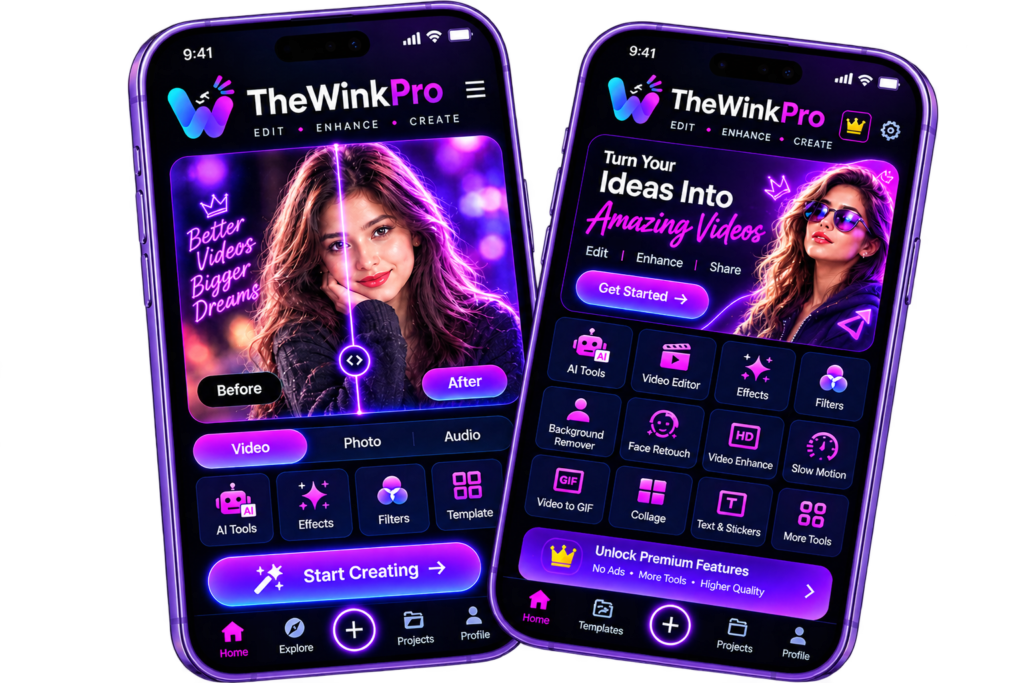
- The Wink Pro is an independent guide website for the Wink video editor — the AI video and photo enhancement app developed by Meitu and first released in December 2021. Wink has passed 50 million downloads because it does one job extremely well: it takes the videos already on your phone — blurry, dark, shaky or old — and makes them look clean, sharp and professional, with no editing experience needed.
- Inside the app you will find AI repair and 4K upscaling, face and body retouching that follows you through the video, automatic captions, object removal, filters, templates and batch enhancement. Creators use it before posting to TikTok, Instagram Reels and YouTube Shorts, and families use it to restore precious old recordings.
- Why do so many videos need rescuing in the first place? Because quality is lost at every step: phones shoot in poor light, hands shake, old devices record at low resolutions — and then WhatsApp, TikTok and Instagram compress the file again before anyone sees it. That is exactly where Wink fits in: its AI is trained for enhancement, so repair work that once took skill and hours now takes one tap and a few seconds.
- That is also what makes Wink different from ordinary video editors. A normal editor gives you a timeline to build a video; Wink is built to fix one — in the cloud, with scene-specific AI models for gaming clips, night footage, portraits and old photos, and adjustable strength so results stay natural.
- Wink suits almost anyone who records video: creators polishing daily TikToks and Reels, small businesses making product videos look premium, and everyday users restoring old family recordings. The app is free to download; the optional VIP subscription unlocks premium AI features and higher limits.
- On this page, The Wink Pro brings everything together in one place — the features, the advanced tools, honest pros and cons, the alternatives, and step-by-step download and install guidance that always points to the official app stores.
Key Features of WinkPro
AI Repair & Quality Improvement
Wink’s AI automatically improves video quality and fixes blur, softness and compression damage, making your clips clearer and sharper. It is the feature most people open the app for — one tap, and a weak video becomes post-worthy.
HD, UHD & 4K Export Support
Save your videos in HD, Full HD, UHD and 4K. Your footage looks crisp and professional on any screen, from a phone to a large TV.
Face Retouch & Beauty Tools
Smooth skin, clear blemishes, whiten teeth, soften wrinkles and eye bags, add fill light and try makeup looks — all tracked naturally across the whole video, not just one frame.
Noise Reduction & Night Fix
Grainy, dark footage from night-outs and low-light rooms gets cleaned and brightened, while the denoise tools keep the result natural instead of waxy.
Filters, Templates & Transitions
Apply trendy filters and colour effects, start from ready-made templates, add stickers, text and music, and connect clips with smooth transitions like fade, slide and zoom.
Auto Captions & Batch Fix
Generate accurate subtitles in multiple languages automatically, and enhance many videos and photos in a single batch — two of the biggest time-savers for regular creators.
Advanced Tools in Wink Pro
Beyond everyday editing, Wink carries a serious AI toolbox. These are the tools that separate it from basic editors.
AI Repair Pro
Auto mode analyses your clip, detects every quality issue and applies the best combination of fixes. Switch to Basic mode when you want manual control over colour, night view and denoise, one slider at a time.
4K Super Resolution — 7 Scene Models
Upscale 480p and 720p videos into crisp 4K Ultra HD. Seven scene-specific models — for gaming clips, night footage, portraits, old photos and more — make sure each type of content gets the right algorithm, and the strength stays adjustable so results never look over-processed.
Old Video Restore & Unblur
Faded home movies, pixelated old recordings and out-of-focus clips are rebuilt detail by detail. It cannot invent what was never recorded, but the improvement on family archives is often dramatic.
Body Editing & Face Shaping
Adjust posture, height, waist and facial features with precision, while the background-lock feature keeps walls and doorways straight — so edits look real, not warped.
AI Figurine, Anime & Avatars
The playful side of Wink’s AI: transform yourself or any object into a collectible-style figurine, an anime character or a cartoon avatar in seconds.
HD Video Converter — Web Tool
Wink’s official browser tool enhances videos online with scene-aware AI — 1080p, 2K and 4K exports, MP4/MOV/MKV support and cloud batch conversion, with nothing to install. Perfect for PC users.
How to Download Wink Pro
Wink is free on both official stores. Follow the route for your device:
On Android
- Open the Google Play Store on your phone.
- Search for “Wink: Video Enhancer & Editor”.
- Check the developer name — it must say Meitu (China) Limited.
- Tap Install and wait for the download to finish.
On iPhone
- Open the App Store.
- Search for “Wink: Video Enhancer & Editor”.
- Confirm the seller is Meitu, then tap Get.
- Approve with Face ID or your Apple ID password.
On PC (Windows & Mac)
- Open your browser and go to the official Wink website — Wink runs right in the browser on PC, so there is no desktop app to download.
- Upload the video you want to enhance (MP4, MOV or MKV).
- Start the enhancement and choose your export quality, up to 4K.
- Download the finished video to your computer.
Stay safe: only download Wink from Google Play or the App Store. “Mod APK” websites are unofficial, frequently bundle malware or steal accounts, and break Meitu’s terms — the genuine app is free, so there is never a reason to risk a modified copy.
How to Install Wink Pro & Make Your First Edit
Because Wink installs from the official stores, there are no APK files, no “unknown sources” settings and no risks. From install to first enhanced video takes about three minutes:
- Install the app from Google Play or the App Store using the steps above.
- Open Wink and allow the photos/videos permission, so the app can reach the clips you want to fix. No account is required to begin.
- Pick a video from your gallery — blurry, dark or low-quality clips show the biggest improvement.
- Run AI Repair (or choose a specific tool like 4K Upscale or Old Video Restore) and watch the before/after comparison.
- Adjust and export. Fine-tune the enhancement strength if needed, then save in HD or 4K and share anywhere.
On PC
On a computer there is nothing to install at all. Just open Wink in your browser, upload a video, let the cloud AI enhance it, and download the result — the same simple flow works on both Windows and Mac.
Wink Pro for PC, iOS & Android
Android Version
The full Wink experience and usually the first to receive new tools: AI enhancement, retouch, templates and batch fix, free on Google Play with an optional VIP upgrade. If you edit on your phone, this is the most complete version of the app.
iOS Version
The same AI toolkit for iPhone and iPad, free on the App Store. VIP is billed through your Apple ID — manage or cancel it anytime in your subscription settings, at least 24 hours before a renewal.
PC Version
Meitu does not publish an official Wink desktop app for Windows or Mac, so beware of any site claiming to offer a “Wink PC download” — those installers are a common malware trap. On a computer, use Wink’s official HD Video Converter in your browser instead: upload a video, enhance it up to 4K (batch jobs included), and download the result.
Alternatives to Wink Pro
Wink specialises in AI enhancement and retouch. If your needs are different, these are the alternatives worth knowing.
CapCut
The leading all-in-one editor for short videos, on mobile and desktop. Its timeline, effects library and template community are stronger than Wink’s, which makes it better for building videos from scratch — but its one-tap repair of damaged footage is not as strong.
Remini
Released in 2019, Remini built its name on AI photo restoration: old and blurred photos come back looking like realistic UHD without losing their authenticity. Excellent for stills; its video tools are narrower than Wink’s.
VivaCut
A professional-leaning mobile editor launched in 2019, with multi-layer editing and green-screen (chroma key) effects. More powerful for complex edits, but less friendly for a beginner who just wants a clip fixed fast.
Vmake
An AI video toolkit aimed at businesses and e-commerce sellers, with talking-video editing, background removal and automatic captions for producing quick marketing clips.
Pros and Cons of Wink
To make you aware of every aspect, here are the pros and cons of the app, stated honestly.
Pros
✓ One-tap AI repair genuinely fixes blurry, dark and low-quality clips.
✓ Supports HD, UHD and 4K video export.
✓ Powerful AI beauty and retouch tools that track faces through video.
✓ Batch enhancement saves serious time.
✓ Easy, beginner-friendly interface.
✓ Free to download and use for core tools.
Cons
✕ The best AI features and higher limits need the VIP subscription.
✕ Some free exports may carry a watermark, depending on the feature.
✕ Enhancement runs in the cloud needs internet and can queue at busy times.
✕ No official desktop app; PC users only get the web converter.
✕ Very badly damaged footage can only be improved so far.
✕ 4K processing can be slow on older phones.
Frequently Asked Questions
What is Wink Pro?
The Wink Pro is your complete guide to The Wink Pro video editor — Meitu’s AI video and photo enhancer. The app fixes blurry clips, restores old videos, upscales footage up to 4K and retouches faces and bodies naturally, and this site walks you through every feature, tool and safe download step.
Is Wink Pro free to use?
Yes. The Wink Pro is free to download on Google Play and the App Store, and its core tools work without paying. The Wink Pro VIP is an optional subscription that unlocks premium AI features, exclusive effects, watermark-free exports on more features and higher limits.
Can I use Wink Pro on a PC?
There is no official The Wink Pro desktop app. On a PC or Mac, use The Wink Pro’s official HD Video Converter in your browser — it enhances and upscales videos online, up to 4K, including batch conversion.
Is it safe to download Wink Pro from APK or mod sites?
No. Modified APKs are unofficial builds that can contain malware, steal accounts and break Meitu’s terms — and they receive no official updates or support. The real app is free on both official stores, so always install it from there.
Is Wink Pro the official Wink Pro website?
No. The Wink Pro is an independent guide and tutorial site that helps you get the most out of the official The Wink Pro app. It is not affiliated with Meitu, and it hosts no app downloads.